The below Anchor Text (link verbiage) and URI (Uniform Resource Identifier) syntax is requested when promoting inbound links to the Hypnosis Motivation Institute (HMI). It is suggested that you alternate the use of these link formats with #1 being the most common.
Grab the Code - Ctrl + Click > Ctrl + C
<a href="https://hypnosis.edu/">Hypnosis Motivation Institute</a>
<a href="https://hypnosis.edu/">HMI College of Hypnotherapy</a>
Grab the Code - Ctrl + Click > Ctrl + C
<a href="https://hypnosis.edu/aha/">American Hypnosis Association</a>
If you are ever in doubt about how to link to a specific page, just look at the Address window of your browser. For example, the direct URI to this page is...
https://hypnosis.edu/media/kit/hmi/links/
Position your cursor anywhere within your Address window. Double Click to select all, Ctrl + C to Copy and then Ctrl + V to Paste into the destination.
Not sure what Anchor Text to use? The first choice would be the Title Element of the page. This is what shows in the Browser Title Window at top left...

The Title Element will be specific to each page that you are on. You can use the View Source function of Internet Explorer and copy the Title Element from the top of the html source.
You'll find the Title Element positioned in the same area (between <head></head>) on every page when you view the source of the page.
<title>Hypnosis Motivation Institute - Guide to Link Development</title>
Text links above are preferred over linked images. If an image link is the only option, then the below format is suggested.
Note: Do not link directly to the HMI Logo images. Right click, save picture as, and then upload to your server. HMI Media Kit - Logo Library

Grab the Code - Ctrl + Click > Ctrl + C
<a href="https://hypnosis.edu/" title="Hypnosis Motivation Institute"><img src="/images/logo-hmi.gif" width="200" height="78" alt="Hypnosis Motivation Institute"></a>
If you have the choice of including both the Logo and Anchor Text, here is a suggestion based on the page being linked to...
Grab the Code - Ctrl + Click > Ctrl + C
<a href="https://hypnosis.edu/"><img src="/images/logo-hmi.gif" width="200" height="78" alt="Hypnosis Motivation Institute"><br>

                    Hypnosis Motivation Institute</a>
Grab the Code - Ctrl + Click > Ctrl + C
<a href="https://hypnosis.edu/"><img src="/images/logo-hmi.jpg" alt="Hypnosis Motivation Institute"><br>

                    Hypnosis Motivation Institute</a>
In reference to the above Image Link with Anchor Text option, the Anchor Text should reflect the Title Element of the page you are linking to. You can use the entire Title Element as the Anchor Text or a portion of it. As long as you are targeting the primary keyword phrase for the page you are linking to.
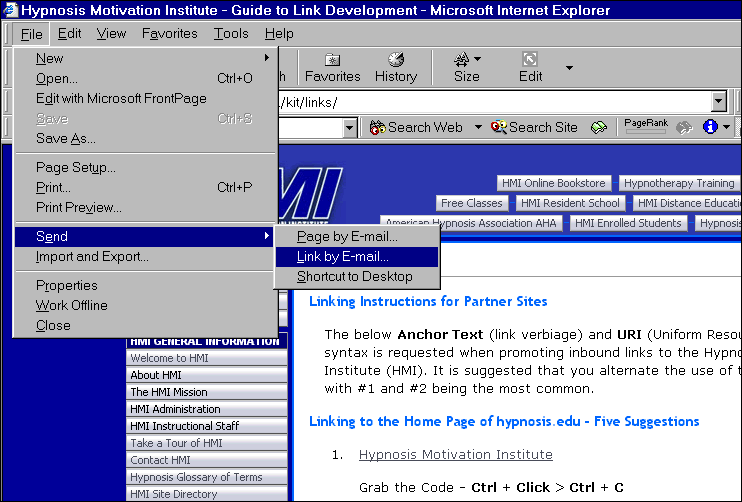
Internet Explorer has a built in feature for emailing page links. Go to...
This will launch your email program and automatically populate the Subject line with the Title Element of the page you are sending along with inserting the correct URI (Uniform Resource Indicator or URL Uniform Resource Locator) in the body of the email message. If a page is titled properly, which all of ours are, this is an excellent way of determining how to link to a page. The Anchor Text (Keyword Phrases) would be the Title Element and the URI comes from the body of the email message.
This is also a neat way to send yourself web pages that you've visited that are of interest. You can then save those emails and organize them by subject, etc.
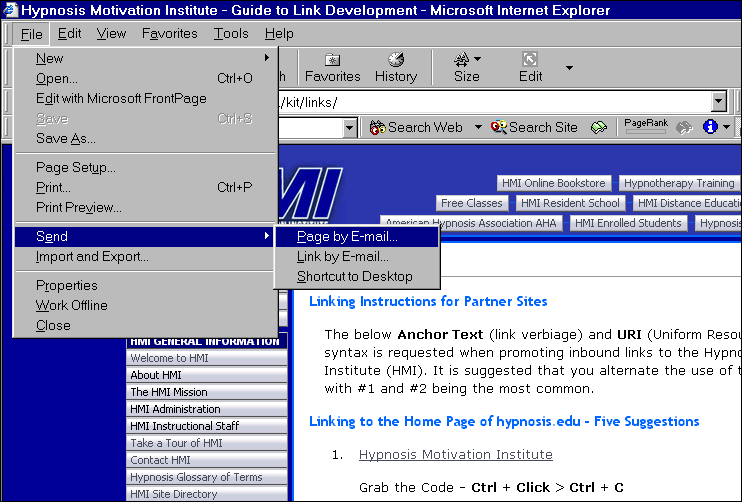
Internet Explorer also has a built in feature for emailing pages. You can easily send someone an html email of a web page. Our pages are developed in a way where you can add your own message above and at the beginning of the email while the entire web page is loaded in the body of the email. Go ahead, give it a try. Go to...
Once the body of the email message has been populated with the page content, there is a small area at the top that is open. Position your cursor above the HMI Logo which will now allow you to type your message. Use your enter key to create a new paragraph or add additional space at top for easy formatting of your message.